How PQC Auth Works
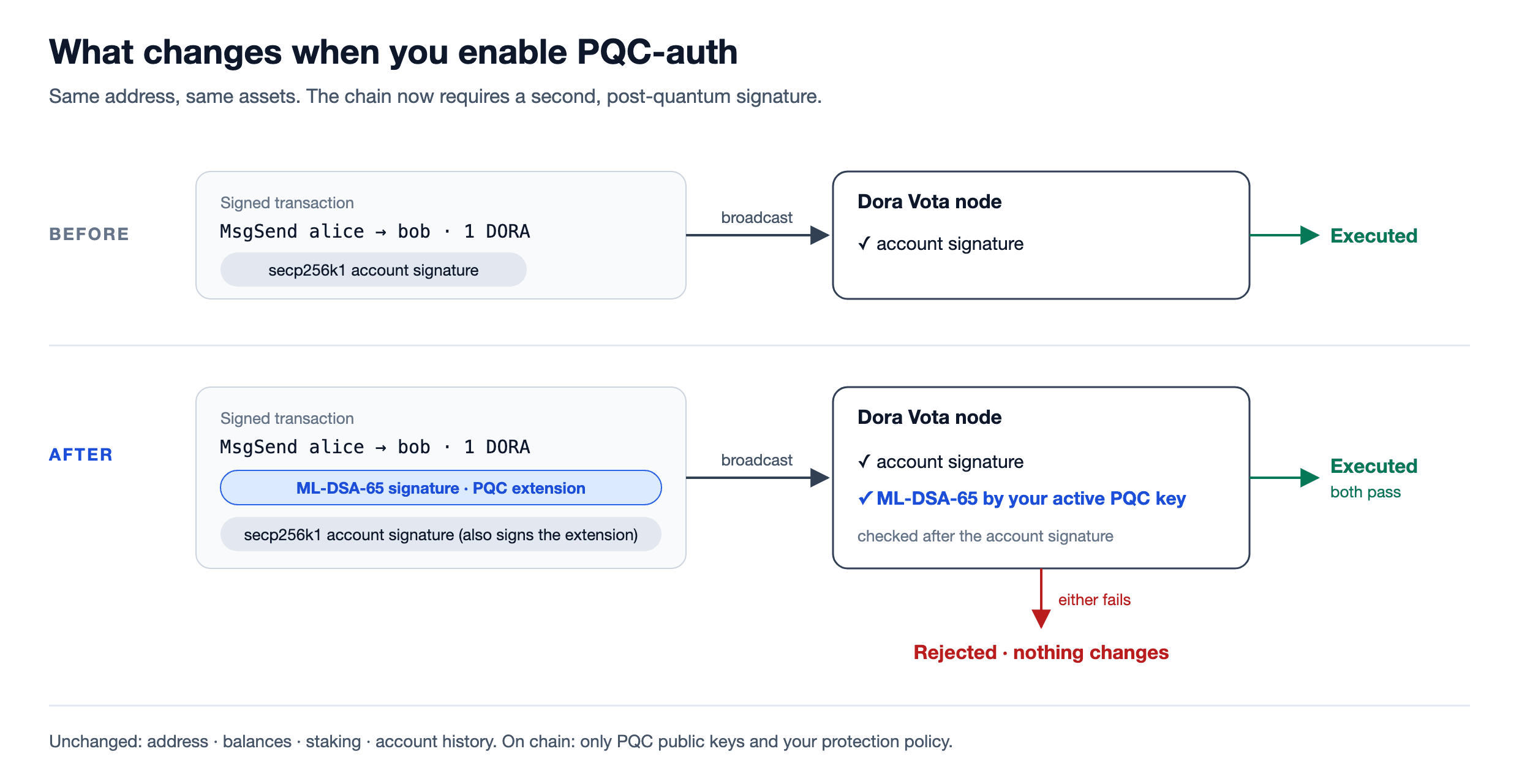
Starting with v1.1.0 (opens in a new tab), Dora Vota supports PQC-auth (opens in a new tab). You can register an ML-DSA-65 post-quantum signing key for an existing account. Once protection takes effect, ordinary transactions sent directly by that account must carry both the original account signature and a PQC signature. Otherwise, the chain rejects them. A few management operations, such as signing-key recovery, use separate authorization rules explained below.
Your address stays the same. Your assets, staking positions, and transaction history stay where they are. There is no need to migrate to a new account.
Why We Built PQC-auth
Most Cosmos accounts today use secp256k1 signatures. A sufficiently powerful quantum computer could use Shor's algorithm to derive a private key from its public key. Once an account sends a transaction, its public key is exposed on-chain.
Such quantum computers do not exist today, but migration takes time. NIST published the post-quantum signature standard FIPS 204 (ML-DSA) (opens in a new tab) in 2024. PQC-auth uses ML-DSA-65, one of the parameter sets defined in that standard.
Moving to a native post-quantum account is the most complete transition, but it also means changing your address, moving assets, restaking, and updating authorizations and application records. PQC-auth offers another path: keep your existing account and let the chain enforce an additional post-quantum authorization.
Three Keys, Three Roles
| Key | Purpose | Where to keep it | When it is used |
|---|---|---|---|
| Original account key (secp256k1) | Preserves your existing identity and signs each transaction | Your wallet machine | Every transaction |
| PQC signing key (ML-DSA-65) | Adds post-quantum authorization | A separate signing device | Ordinary protected transactions and most key-management operations |
| PQC recovery key (ML-DSA-65) | Authorizes a replacement if the signing key is lost | An offline device, with a separate backup | Only during recovery |
The chain stores only the two PQC public keys and your protection policy. Private keys are never uploaded and do not need to leave their respective devices.
How It Works
Register Once
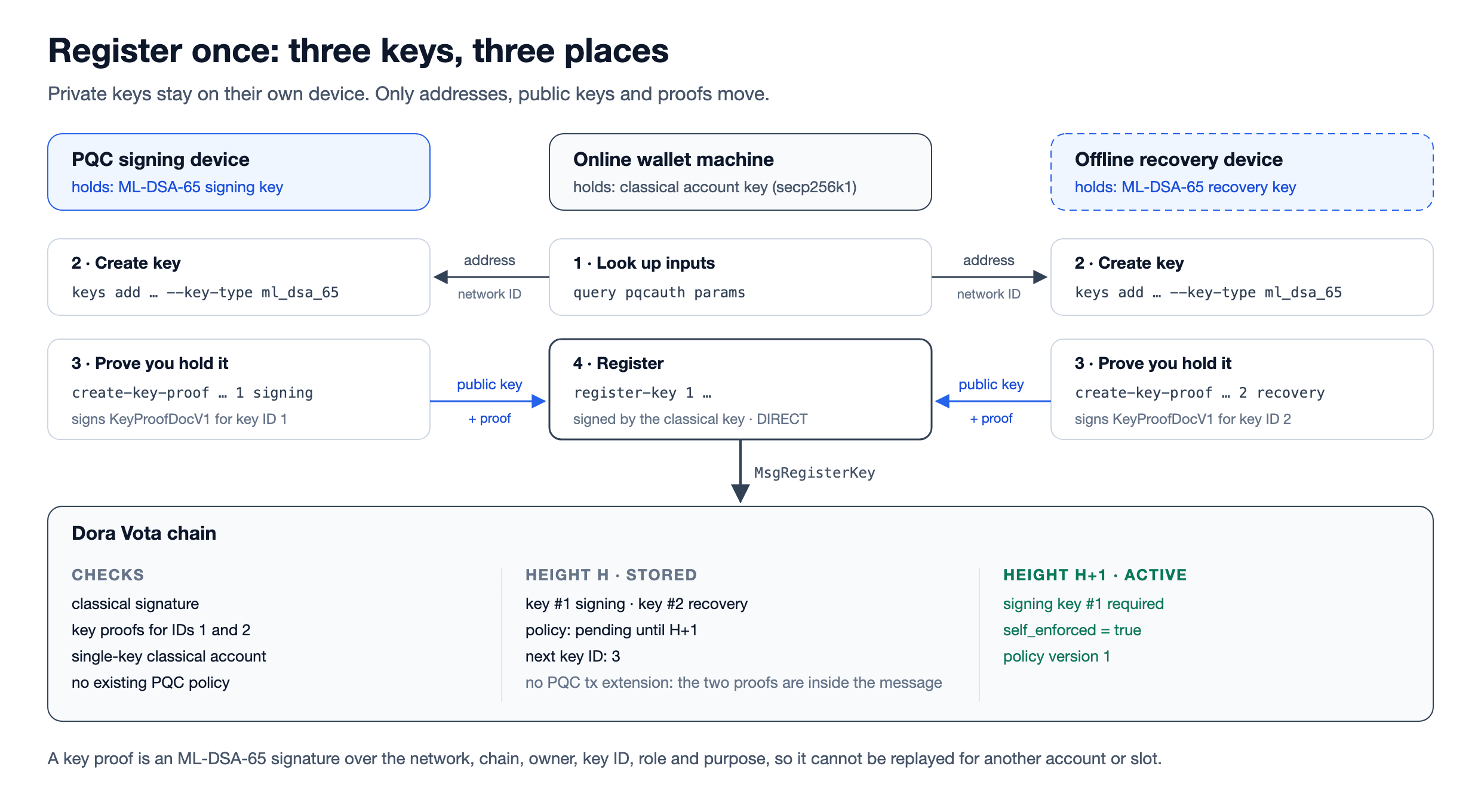
Two separate devices each generate an ML-DSA-65 key and sign a key proof to demonstrate possession. Each proof binds the network, chain, account address, key ID, role, and purpose. It cannot be reused for another account or context.
The online wallet machine includes both public keys and proofs in a MsgRegisterKey, signs it with the original account key, and broadcasts it. If the transaction succeeds at height H, the chain records signing key #1, recovery key #2, and a pending policy. Protection takes effect in the next block, H+1.
The original account key signs the registration transaction. The two proofs are themselves ML-DSA signatures included in the message, so registration does not require the PQC extension used by ordinary protected transactions.
Send a Protected Transaction
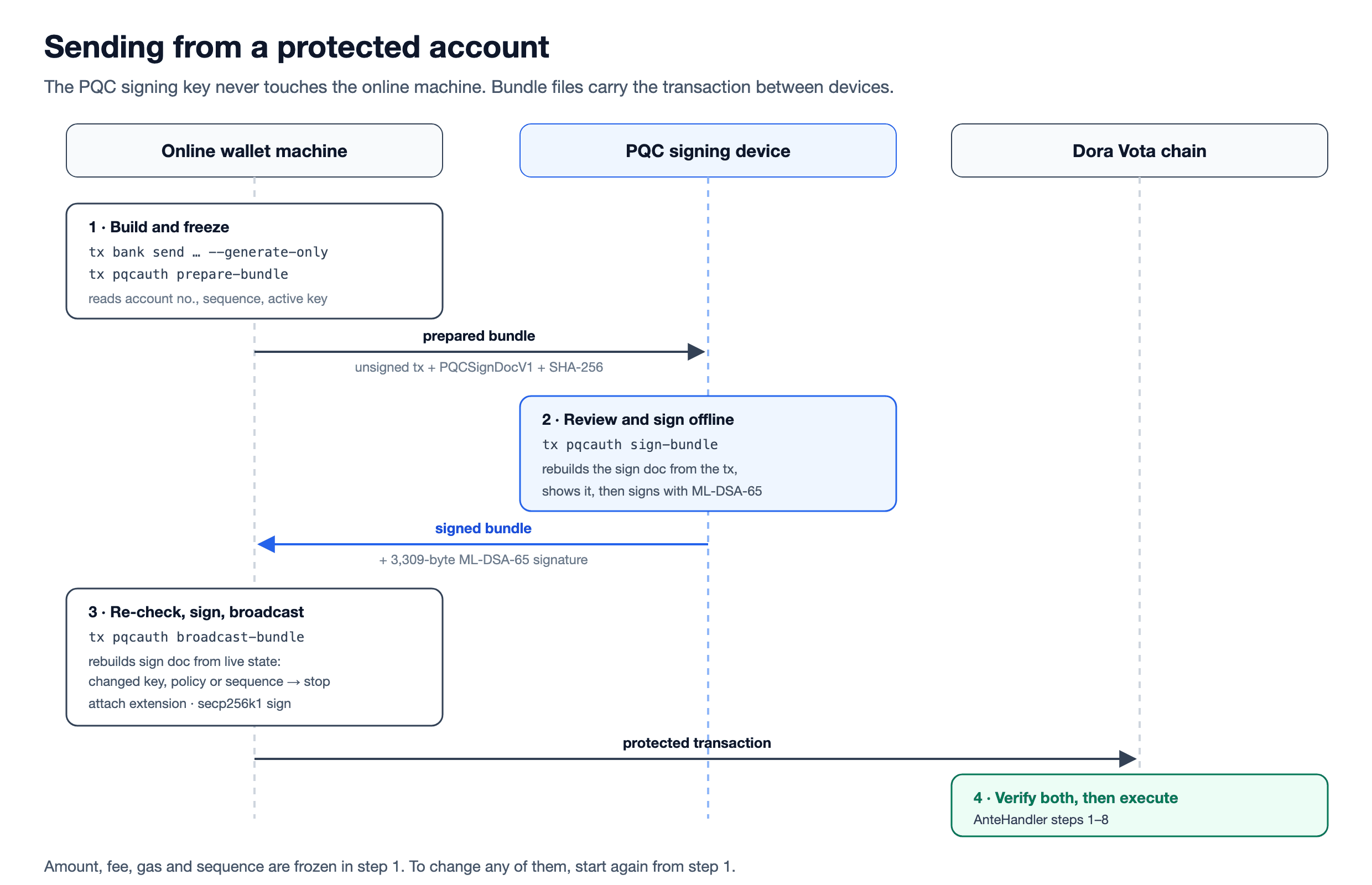
The PQC signing key stays off the online machine. Transactions move between devices as signing-bundle files:
- The online machine freezes the transaction. Generate an unsigned transaction, then use
prepare-bundleto read the on-chain account number, sequence, current PQC key, and policy version, and build the sign document. - The signing device signs offline.
sign-bundlerecomputes the sign document from the transaction contents and displays it for review. After confirmation, it signs with ML-DSA-65. - The online machine checks and broadcasts.
broadcast-bundlerecomputes the sign document against the latest on-chain state. It stops if the key, policy, or sequence has changed. If everything matches, it attaches the PQC signature, adds the original account signature, and broadcasts.
The amount, fees, gas, and sequence are fixed in step 1. To change any of them, start again from step 1.
What the Signatures Protect
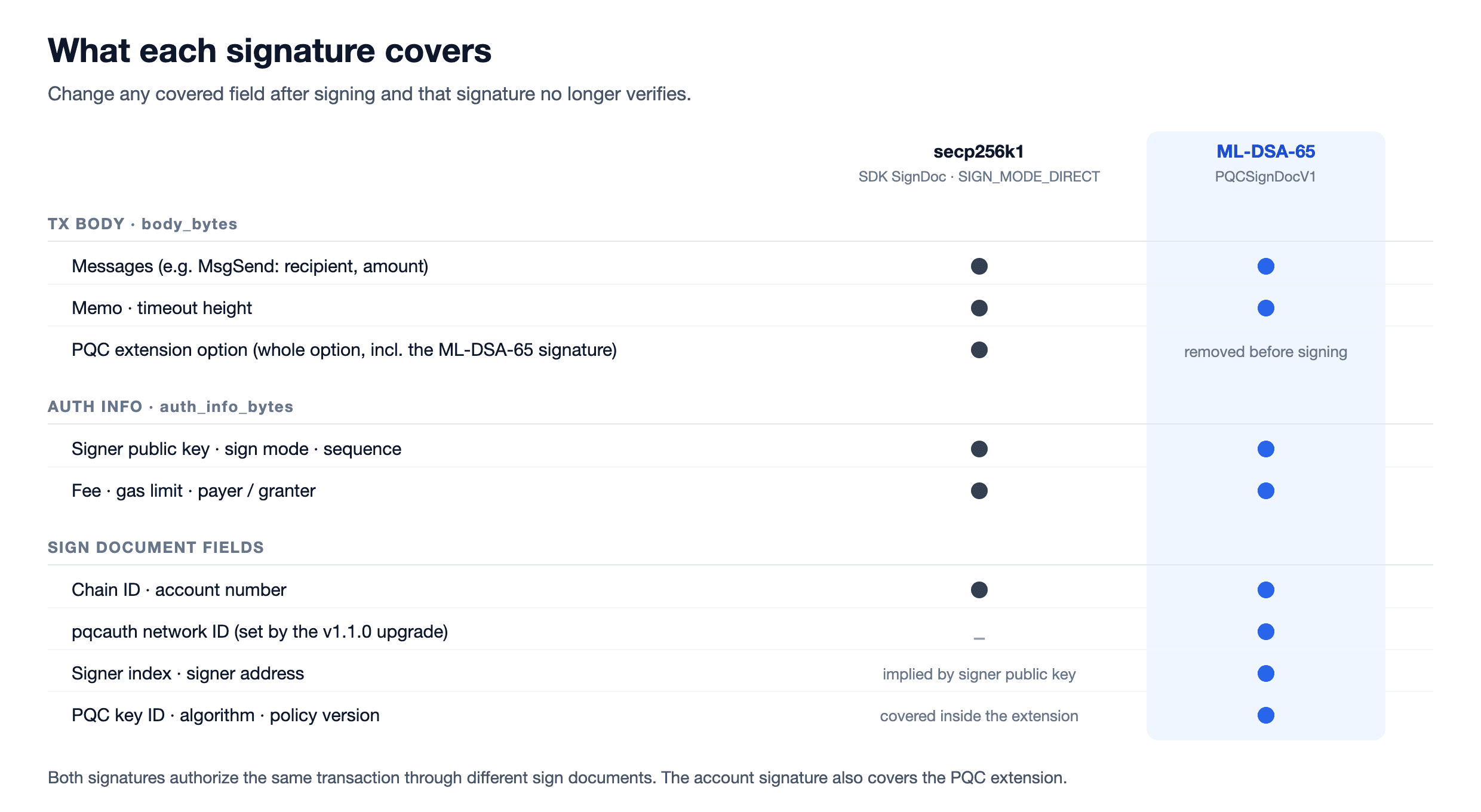
The PQC signature binds the transaction contents—including the recipient, amount, memo, timeout height, fees, gas limit, and fee payer or granter—to the network ID, chain ID, account number, sequence, signer, PQC key ID, algorithm, and policy version. Changing the recipient, amount, or fees after signing invalidates the PQC signature.
ML-DSA-65 signs a dedicated PQC sign document containing the transaction body with the entire PQC extension removed, the transaction’s authorization and fee information, and the context fields above. The original account key then signs the standard Cosmos sign document, whose transaction body includes the PQC extension. Both signatures authorize the same transaction, but they do not sign identical bytes. A PQC signature cannot be reused with a different recipient, amount, fee, or account sequence.
How Nodes Check a Transaction
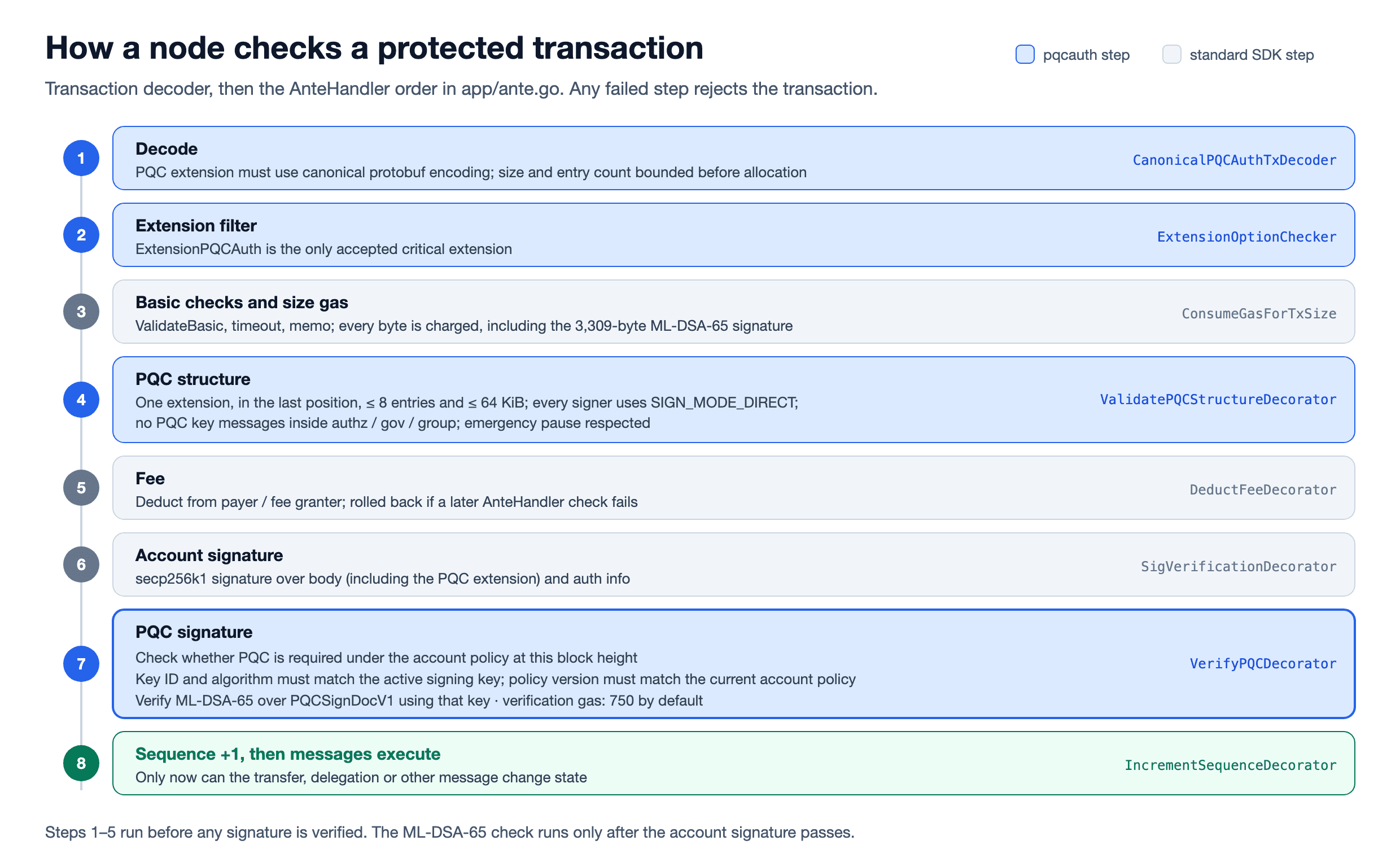
Every validator enforces these checks before executing the transaction. Protection is not a website setting and does not depend on a single server. Inexpensive checks, such as format, size, and fees, run first. The original account signature must pass before the ML-DSA-65 signature is verified. If any of these preliminary checks fail, the transaction is not executed, no fee is charged, and on-chain state is unchanged. If all preliminary checks pass but message execution fails—for example, because of insufficient funds—the fee is still charged and the sequence increases.
Lost Your Signing Key? Recovery Includes a Waiting Period
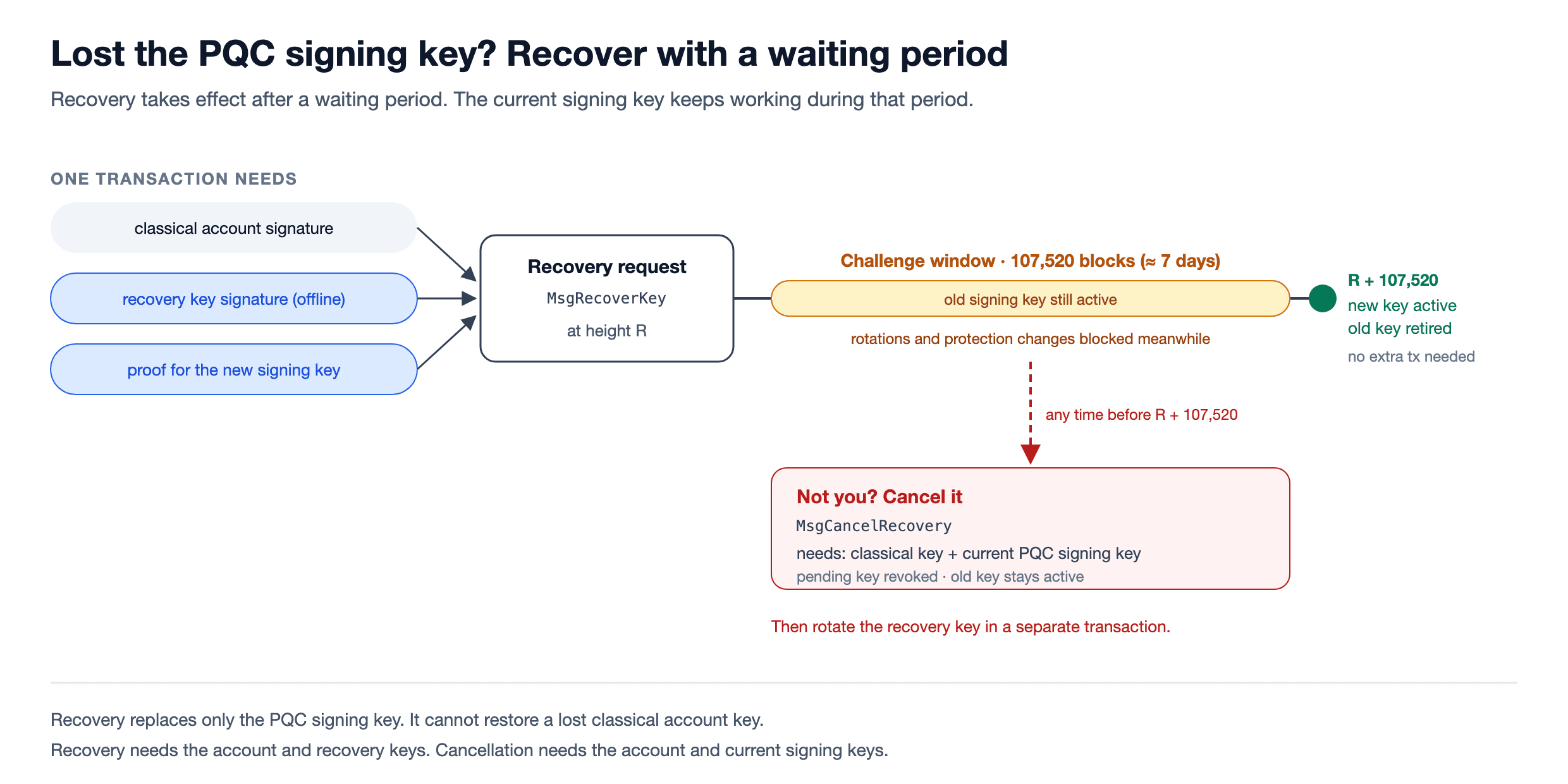
Recovery requires a transaction with three things: the original account signature, a signature from the offline recovery key, and proof of possession of the new signing key. The lost signing key is not required.
Recovery does not take effect immediately. The chain waits recovery_delay_blocks blocks before the new signing key replaces the old one. The v1.1.0 default is 107,520 blocks (approximately seven days). This value cannot be changed through governance after initialization. Check the target network's actual value with dorad query pqcauth params --node "$RPC". During the waiting period:
- The old signing key remains usable.
- Key rotation and protection-toggle operations are blocked.
- If you did not initiate the recovery, you can cancel it with the original account key and current signing key, then submit a separate transaction to replace the recovery key.
Stealing the recovery key alone does not allow someone to immediately take over your PQC protection. The recovery key can replace a PQC signing key; it cannot recover a lost original account key.
Who Is It For?
| Your situation | Recommendation |
|---|---|
| You have a single-signer classical account, hold significant assets, can keep keys on separate devices, and are comfortable with the command line | A good fit. Try the complete workflow with a small account first |
| You rely on a browser wallet for everyday transactions | Confirm that your wallet and PQC signer can construct and preserve the PQC extension and sign in SIGN_MODE_DIRECT. An ordinary wallet alone is insufficient; this guide uses the dorad CLI |
| You use a Ledger hardware wallet | The v1.1.0 CLI’s Amino-only Ledger signing backend cannot register or send protected transactions, which require SIGN_MODE_DIRECT |
| You use a multisig account | Registration is not currently supported; existing transactions are unaffected |
| You use a native ML-DSA account | Not needed. The account already uses post-quantum signatures and cannot register PQC-auth |
| You operate a validator or a business account that must transact at any time | Evaluate carefully. Each emergency pause is capped at 46,080 blocks (approximately 72 hours). Governance can renew a pause before it expires, so a continuous pause can last longer. During a pause, protected accounts can only initiate or cancel recovery |
What Is Protected?
The first phase of PQC-auth protects the transaction sender's own signature.
| Scenario | Protected? |
|---|---|
| Ordinary transactions sent directly by your protected account | Yes. Both signatures are required |
| An authz authorization you grant to someone else | No. The grantee can use their own signature to perform authorized actions on your behalf. For example, a transfer authorization lets them move your funds within its limits |
| A feegrant allowance you give someone else | No. The grantee can use your balance to pay fees for their own transactions until the allowance is exhausted. A feegrant does not directly authorize asset transfers |
| Validator consensus signatures or IBC light clients | No. These are separate mechanisms |
| A lost original account key | No. The recovery key cannot restore it |
If you have granted authz or feegrant permissions to other addresses, review them and revoke anything you no longer need before registering. You can also revoke them afterward, but the revocation transaction will then require the signing-bundle workflow.
RPC="https://vota-rpc.dorafactory.org"
OWNER=YOUR_DORA_ADDRESS
dorad query authz grants-by-granter "$OWNER" --node "$RPC"
dorad query feegrant grants-by-granter "$OWNER" --node "$RPC"
Extending protection to delegated authorizations is a direction we are considering for future versions.
To register your keys and send a protected transfer, follow the CLI Guide.